Short answer: install Still Dock on the child's Mac and Still Dock for iPhone on your phone. If both use the same Apple Account in iCloud, the Mac appears in the app and you switch its locks from there. If the Mac uses your child's own Apple Account, sign the Mac and the iPhone app in to the same Still Dock account with your email, and the Mac appears in the app that way.
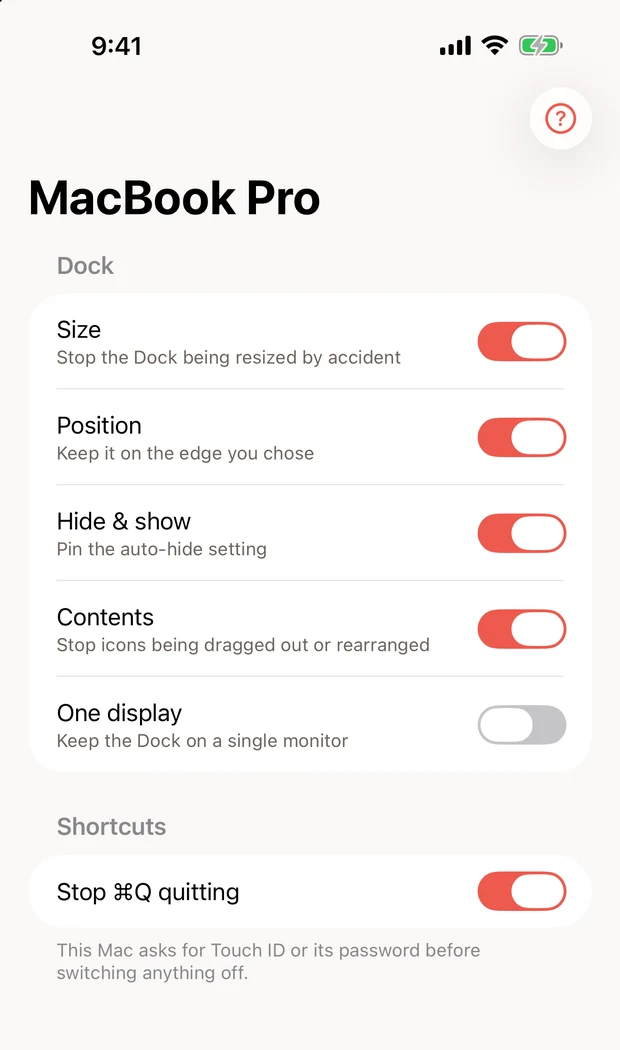
What you can switch
- Size and Position, so the Dock stays the way you set it.
- Contents, so icons cannot be dragged out (direct download only).
- One display, if the Mac has a second screen.
- Stop Cmd Q quitting, so homework or a game is not closed by a slip.
- Presenting, to hide the Dock for a school presentation.
Pro locks switch from your phone when that Mac has Still Dock Pro. The size lock works from your phone on any Mac running Still Dock.
The account question
The iPhone app finds Macs through iCloud first, using the Apple Account signed in on both devices. For any Mac iCloud does not find, the app looks through your Still Dock account.
- Same Apple Account on the Mac and your iPhone: the Mac appears in the app. Done.
- Your child has their own Apple Account on the Mac: sign the child's Mac and the iPhone app in to the same Still Dock account, using your email. The Mac then appears in the iPhone app. You can also connect ChatGPT or Claude to that account and say "Lock the Dock on Maya's MacBook" from your phone. See asking Claude to lock your Mac Dock.
- You want a Dock that stays fixed even if Still Dock is quit: install the locks as a configuration profile. See locking the Dock with a configuration profile. A profile cannot be switched from your phone; you change it at the Mac.
To keep your child from quitting Still Dock or removing it, pair it with Screen Time and a Standard account. See stopping a child quitting apps with Screen Time.
Keep them from switching it back
- Give your child a Standard account, not an admin one.
- Turn on Touch ID or password approval in Still Dock, so turning a lock off at the Mac needs you.
- On your phone, turning a lock off asks for Face ID first.
- If your child uses Terminal, Still Dock's Lock Permanently (direct download, Pro) installs the locks as configuration profiles that Terminal cannot undo.
Screen Time handles hours and apps; Still Dock handles the Dock and quitting. They work side by side. More ideas in locking the Dock on a family Mac.
Common questions
Does my child see a notification when I change a lock?
No notification appears. The Dock simply stops or starts responding to drags.
What if the Mac is asleep?
The request waits, and one older than 10 minutes is dropped. Your phone tells you if the Mac has not answered after about a minute.
Can I use my Apple Watch?
Yes, with Pro. The Watch app switches the same locks.